HTTP vs SOCKS5 Proxies: Key Differences Explained
A clear comparison of HTTP and SOCKS5 proxy protocols. Learn which type is better for browsing, scraping, gaming, and privacy in 2026.
HTTP vs SOCKS5 Proxies: Key Differences Explained
Choosing the wrong proxy type can mean slower speeds, blocked requests, or privacy leaks. This guide breaks down the real differences between HTTP and SOCKS5 proxies so you can pick the right one.
How HTTP Proxies Work
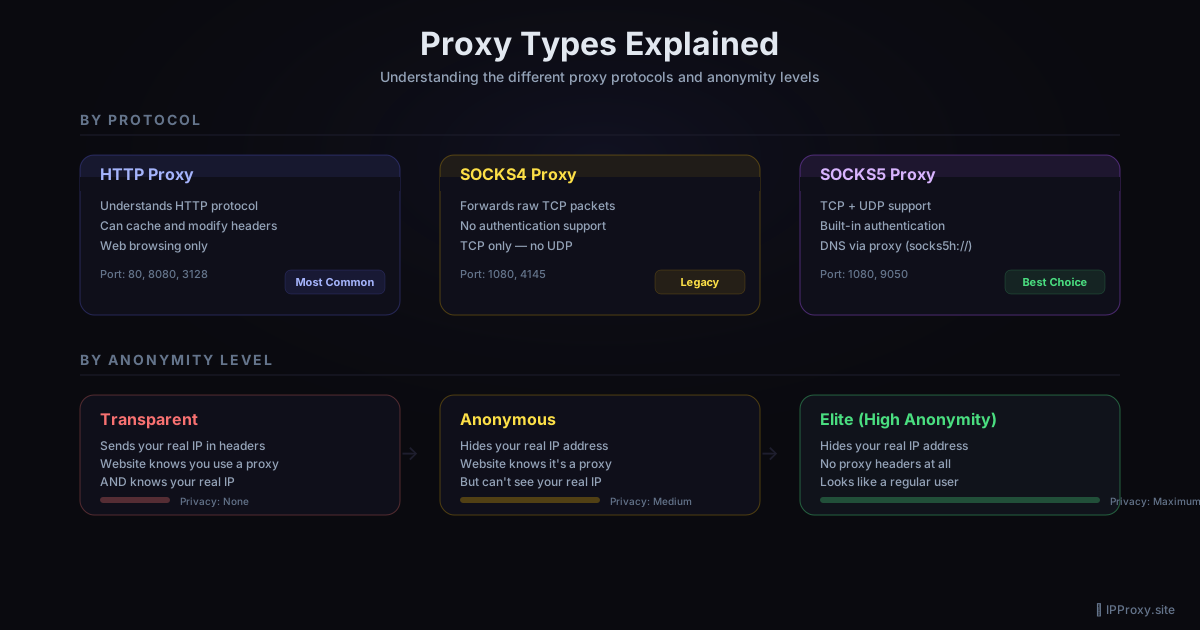
An HTTP proxy sits between your browser (or script) and the website. It understands HTTP — it reads your request headers, can modify them, and forwards the request to the target server.
Your browser → HTTP proxy → Website
                ↕ reads/modifies HTTP headers
Key characteristics:
- Only handles HTTP and HTTPS traffic
- Can read and modify request headers (User-Agent, Referer, etc.)
- Can cache responses
- Websites can detect them via X-Forwarded-For or Via headers
- Widely available and easy to configure
How SOCKS5 Proxies Work
SOCKS5 operates at a lower level — it just forwards raw TCP (and UDP) packets without understanding or modifying the contents. It doesn't know or care whether you're sending HTTP, FTP, SMTP, or game traffic.
Your app → SOCKS5 proxy → Any server
             ↕ forwards raw bytes
Key characteristics: - Handles any TCP or UDP traffic - Cannot read or modify your data - Supports authentication (username/password) - Can resolve DNS through the proxy (prevents DNS leaks) - Harder for websites to detect
Direct Comparison
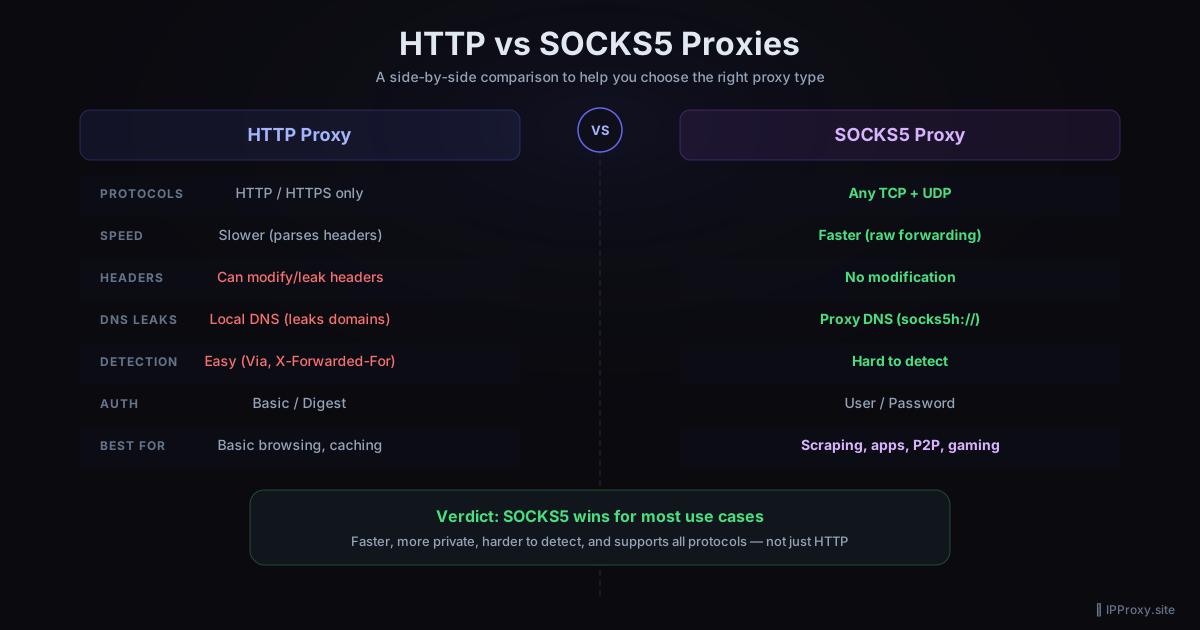
| Feature | HTTP Proxy | SOCKS5 Proxy |
|---|---|---|
| Protocols | HTTP/HTTPS only | Any TCP/UDP |
| Speed | Slower (parses headers) | Faster (raw forwarding) |
| Header modification | Yes — can add/remove headers | No |
| DNS resolution | Local only | Can resolve via proxy |
| Authentication | Basic/Digest | Username/Password |
| Detection difficulty | Easy to detect | Harder to detect |
| Caching | Supports caching | No caching |
| UDP support | No | Yes |
| Best for | Web browsing, basic scraping | Scraping, apps, P2P, gaming |
When to Use HTTP Proxies
HTTP proxies are a good choice when you:
- Just need basic web browsing through a different IP
- Want caching to speed up repeated requests
- Need header manipulation (e.g., adding custom headers for scraping)
- Don't need non-HTTP protocols like FTP or game traffic
- Are on a budget — HTTP proxies are more common and often free
Example: Web scraping with an HTTP proxy
import requests

proxies = {"http": "http://103.21.44.2:8080", "https": "http://103.21.44.2:8080"}
resp = requests.get("https://example.com", proxies=proxies)
When to Use SOCKS5 Proxies
SOCKS5 proxies are better when you:
- Need maximum privacy — no header leaks, DNS resolution through proxy
- Are running non-HTTP traffic — game clients, torrent clients, SSH tunnels
- Want better speed — no overhead from parsing HTTP headers
- Need to avoid detection — SOCKS5 doesn't add telltale proxy headers
- Are doing high-volume scraping — faster throughput per connection
Example: Scraping with a SOCKS5 proxy
import requests

proxies = {"http": "socks5h://45.77.10.1:1080", "https": "socks5h://45.77.10.1:1080"}
resp = requests.get("https://example.com", proxies=proxies)
The DNS Leak Problem
This is the biggest practical difference most people miss.
With an HTTP proxy, your computer resolves the domain name locally, then sends the IP to the proxy. Your ISP can see every domain you visit even though the actual traffic goes through the proxy.
With SOCKS5 (using socks5h://), DNS resolution happens on the proxy server. Your ISP only sees a connection to the proxy IP — they can't see which domains you're visiting.
Speed Comparison
In practice, SOCKS5 proxies are 10-30% faster than HTTP proxies for the same server, because:
- No HTTP header parsing overhead
- No header injection (X-Forwarded-For, Via)
- Raw TCP forwarding is simpler than HTTP proxying
For web scraping at scale, this difference compounds — 1,000 requests through SOCKS5 can save minutes compared to HTTP.
Security Considerations
Neither HTTP nor SOCKS5 proxies encrypt your traffic by default. If you need encryption:
- Use HTTPS websites (the proxy just forwards the encrypted tunnel)
- Layer a VPN on top of the proxy
- Use SSH SOCKS tunneling for encrypted SOCKS5
Free proxies (both HTTP and SOCKS5) should never be used for sensitive data like banking or login credentials. The proxy operator can potentially see unencrypted traffic.
Which Should You Choose?
Choose HTTP if: You're just browsing the web, need caching, or want the simplest setup.
Choose SOCKS5 if: You need speed, privacy, non-HTTP protocol support, or are doing serious scraping.
For most users who need a proxy beyond basic browsing, SOCKS5 is the better choice. It's faster, more private, and more versatile.
Get Free Proxies
IPProxy.site provides both free HTTP and SOCKS5 proxy lists, validated every 30 minutes. HTTP proxies are available instantly; unlock the full SOCKS5 list by completing a quick offer.
Related Guides
- Free SOCKS5 Proxy List 2026 — get validated SOCKS5 proxies updated every 30 min
- How to Use a SOCKS5 Proxy with Python — code examples for requests, aiohttp, urllib3
- How to Bypass Geo-Restrictions — access region-locked content
- Free Proxy Checker — verify a proxy works before using it
Get a Fresh, Tested Proxy Right Now
Every proxy is validated every 30 minutes. 1878 working proxies available right now.